Supported CAD Files
A supported CAD file is a file format that can be imported or exported in Visual Components Premium 4.8.
| Name | Version | Extension | Import | Export |
| 3D Manufacturing Format |
1.2.3 |
.3mf | ✔ | ✔ |
| 3D Studio | All | .3ds | ✔ | ✔ |
| ACIS | Up to 2023 | .sat, .sab | ✔ | ❌ |
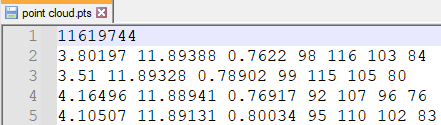
| ASCII Point Cloud file | All | .xyz, .pts, .xyzrgb | ✔ | ❌ |
|
Autodesk FBX |
FBX ASCII: 7100 to 7500. Binary: all. |
.fbx |
✔ |
✔ |
| Autodesk Inventor | Up to 2024 | .ipt, .iam | ✔ | ❌ |
| Autodesk Naviswork | Version 2012 to 2024 | *.nwd | ✔ | ❌ |
| Autodesk RealDWG | AutoCAD 2000-2019 | .dwg, .dxf | ✔ | ✔ |
| Binary point cloud file | All | .bxyz | ✔ | ❌ |
| CATIA V4 | Up to 4.2.5 | .session, .dlv, .exp | ✔ | ❌ |
| CATIA V5 | Up to V5_6R2023 | .CATDrawing, .CATPart, .CATProduct, .CATShape, .cgr | ✔ | ❌ |
| CATIA V6 | Up to V5-6 2019 | .3dxml | ✔ | ❌ |
| COLLADA | All | .dae | ✔ | ❌ |
| Creo | Pro/Engineer 19.0 to Creo 10.0 | .asm, .neu, .prt, .xas, .xpr | ✔ | ❌ |
| GL Transmission Format | Version 2.0 only | .gltf, .glb | ✔ | ❌ |
| I-deas | Up to 13.x (NX5) and NX I-deas 6 | .mf1, .arc, .unv, .pkg | ✔ | ❌ |
| IFC2x | 2 to 4 | .ifc, .iczip | ✔ | ❌ |
| IGES | 5.1 to 5.3 | .igs, .iges | ✔ | ❌ |
| Igrip/Quest/VNC | All | .pdb | ✔ | ✔ |
| JT | Up to 10.6 | .jt | ✔ | ✔ |
| Parasolid | Up to v35.1 | .x_b, .x_t, .xmt, .xmt_txt | ✔ | ❌ |
| PRC | All | .prc | ✔ | ✔ |
| Revit | 2015 - 2023 | .rvt | ✔ | ❌ |
| Robface | All | .rf | ✔ | ❌ |
| Rhino | From 4 to 7 | .3dm | ✔ | ❌ |
| Solid Edge | V19-20, ST-ST10, 2023 | .asm, .par, .pwd, .psm | ✔ | ❌ |
| SolidWorks | 97 up to 2023 | .sldasm, .sldprt | ✔ | ❌ |
| STEP | Up to AP 203 E1/E2, AP 214 and AP 242 | .stp, .step | ✔ | ✔ |
| Stereo Lithography (ASCII and Binary) | All | .stl | ✔ | ✔ |
| U3D | ECMA-363 1st, 2nd and 3rd editions | .u3d | ✔ | ✔ |
| Unigraphics (Siemens PLM software NX) | v11 to v18, NX to NX12, and NX1847 to NX2212 | .u3d | ✔ | ✔ |
| VDA-FS | 1.0 and 2.0 | .vda | ✔ | ❌ |
| VRML | 1.0 and 2.0 | .wrl, .vrml | ✔ | ✔ |
| Wavefront | All | .obj | ✔ | ✔ |
Notes:
- Export to JT does not contain textures nor polylines.
- Export to OBJ does contain textures.
- Export to VRML does not contain materials
- Export to STEP uses AP 242 edition 3 and exports tessellated data. It does not export mathematical data. Be aware when importing an exported STEP file in other CAD systems you might encounter some issues. For example, some CAD systems like Solid Edge try to import STEP files using mathematical data. And some CAD systems do not support or partially support AP 242.
- When exporting to DWG 2013, a layer is assigned to each object based on component name or if the object has a LayerName property. A color is assigned to geometry based on the color of their material, which is a diffusion vector or RGB color. If geometry has a null or black material, it is not assigned any color, so its color is defined by its layer. The resulting format is DWG, so any DWG reader (CAD software) should be able to access those layers and assign color to them. These layers are visible, for example, in Autodesk DWG TrueView. When importing a DWG, geometry with no color are assigned a black material because RGB values of (0,0,0) equals black. To avoid these issues, set the Material property of a component to something other than null, for example orange.
- The positions of points in a point cloud file are assumed to be in meters unless the first line of the point cloud file contains the total number of points; then, the positions are assumed to be in millimeters.