Common tab
NOTE: This topic is only applicable to the following Robotics OLP products:
- Visual Components Premium OLP
- Visual Components Professional OLP
- Visual Components Robotics OLP
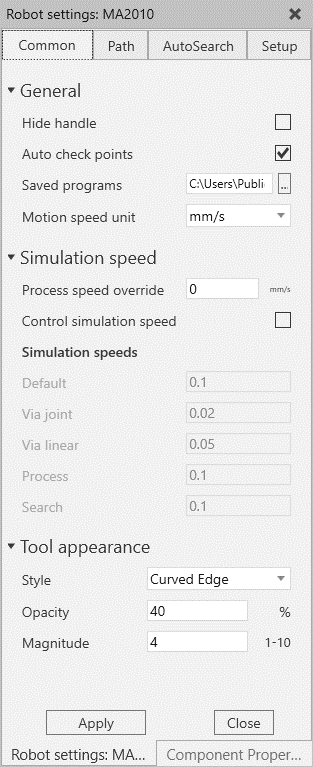
General
- Hide handle: Hide robot jogging handle from 3d view (does not work when jog manipulation mode is active)
- Auto check points: toggles if path is checked automatically after creation\modification. Auto checks each point on path and includes following checks: reachability, singularity, and joint limits
- Saved programs: Directory where the exported programs and templates are saved. The path can be changed as needed.
Simulation speed:
- Process speed override: during the simulation, this value will be used on all paths when executing process points.
- Control simulation speed: Control the simulation speed by checking and adjusting values for different motion types
Tool appearance: Settings for tool preview appearance in weld and search paths. The tool preview is visible in the 3D view always on robot points on selected path.