WPS Rule Selector
NOTE: This topic is only applicable to the following Robotics OLP products:
- Visual Components Premium OLP
- Visual Components Professional OLP
- Visual Components Robotics OLP
The WPS Rule Selector is used to find and apply predefined WPS rules to weld statements. You can create and manage WPS Rules with WPS Rule Manager.
WPS Rule Selector can be found on the PROGRAM tab, in the Templates under the Rules section.
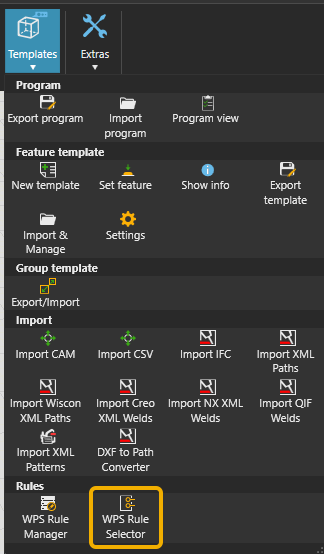
Workflow for using WPS Rule Selector
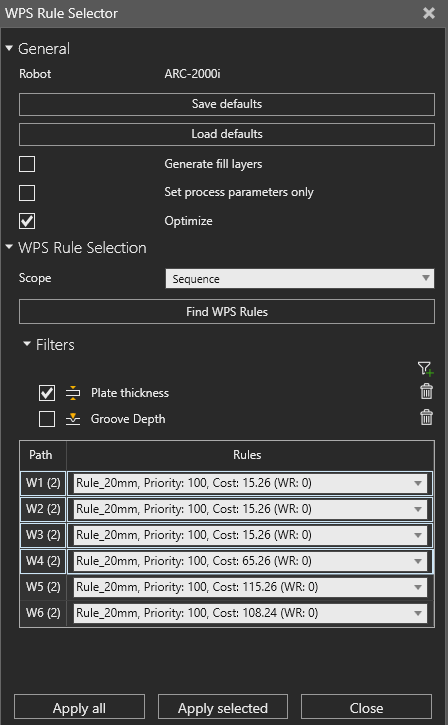
- Open the WPS Rule Selector.
- Select the scope to which welds you want to search WPS Rules for.
- Selected: Finds WPS Rules for selected welds.
- Sequence: Finds WPS Rules for all the welds in the current sequence.
- Program: Finds WPS Rules for all the welds of the current program.
- Select which WPS Rule Filters you want to apply.
- You can add filters by clicking

- After adding a filter, make sure you also enable it to make it active.
- You can add filters by clicking
- Click Find Rules.
- Review the results and adjust which rules apply to specific welds if needed.
- Use Apply All or Apply Selected to update weld statements
Filters
The Rule Selector includes multiple filters to narrow down applicable WPS rules. These filters check rule properties such as:
- Plate thickness
- Throat thickness (a-value)
- Seam angle
- Welding position
- Weld type
Filters can be toggled on/off. When active, the selector evaluates weld data against rule constraints.