Spot path Importer options
NOTE: This topic is only applicable to the following Robotics OLP products:
- Visual Components Premium OLP
- Visual Components Professional OLP
- Visual Components Robotics OLP
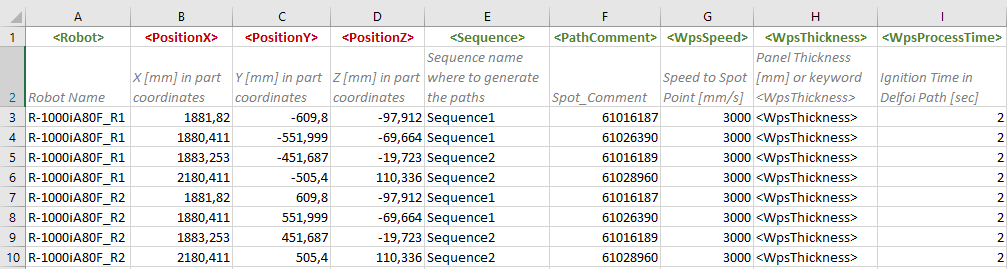
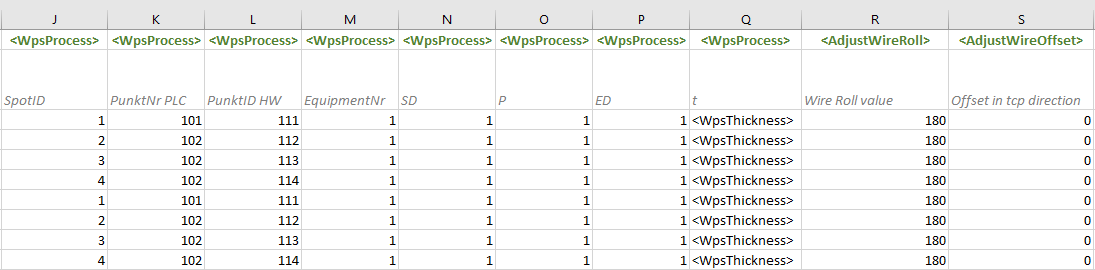
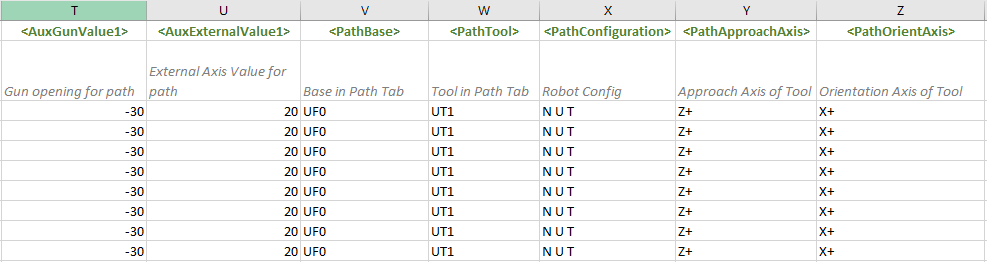
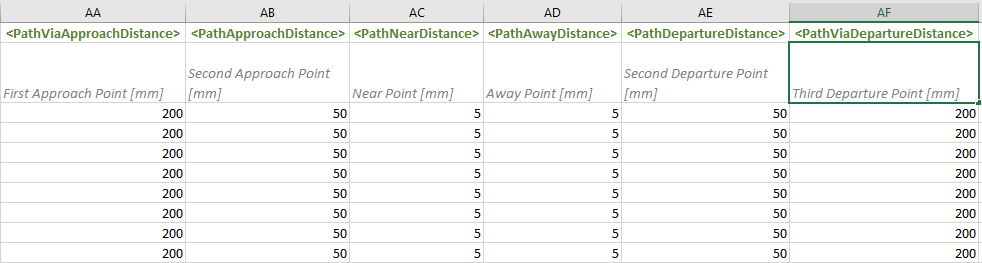
Spot importer contents and their explanation.
|
|
Keyword name |
Default value |
Unit |
Description |
|
|
<PositionX> |
|
mm |
Spot Point X-coordinate value in part coordinates |
|
<PositionY> |
|
mm |
Spot Point Y-coordinate value in part coordinates |
|
|
<PositionZ> |
|
mm |
Spot Point Z-coordinate value in part coordinates |
|
|
<Robot> |
active robot in layout |
string |
Robot Name in layout if csv file contains spot data for multiple robots |
|
|
<Sequence> |
active sequence in layout |
string |
Sequence name where to generate the paths |
|
|
<PathComment> |
|
string |
Comment for path |
|
|
<WpsSpeed> |
|
mm/s |
Motion speed to spot point |
|
|
<WpsThickness> |
<WpsThickness> |
mm |
Panel thickness (can be automatically measured from the model) |
|
|
<WpsProcessTime> |
|
sec |
Spot Weld process time (for simulation purposes) |
|
|
<WpsProcess> |
|
sting |
WPS process parameter, CSV can have multiple columns with this keyword. Second row in CSV will define process parameter name |
|
|
<AdjustWireRoll> |
|
angle |
Rotation over TCP |
|
|
<AdjustWireOffset> |
|
mm |
Offset in TCP direction |
|
|
<AuxGunValue1> |
|
mm or angle |
Spot Gun opening for path, also <AuxGunValue2> available |
|
|
<AuxExternalValue1> |
|
mm or angle |
External Axis Value for path, AuxExternalValue1…AuxExternalValue12 available |
|
|
<PathBase> |
|
String |
Robot Base definition for Path |
|
|
<PathTool> |
|
String |
Robot Tool definition for Path |
|
|
<PathConfiguration> |
|
String |
Robot Configuration definition for path |
|
|
<PathApproachAxis> |
|
String |
Approach Axis of Tool (TCP) |
|
|
<PathOrientAxis> |
|
String |
Orientation Axis of Tool (TCP) |
|
|
<PathViaApproachDistance> |
|
mm |
First Approach Point [mm], if cell is empty, the point is not generated |
|
|
<PathApproachDistance> |
|
mm |
Second Approach Point [mm], if cell is empty, the point is not generated |
|
|
<PathNearDistance> |
|
mm |
Near Point [mm], if cell is empty, the point is not generated |
|
|
<PathAwayDistance> |
|
mm |
Away Point [mm], if cell is empty, the point is not generated |
|
|
<PathDepartureDistance> |
|
mm |
Second Departure Point [mm], if cell is empty, the point is not generated |
|
|
<PathViaDepartureDistance> |
|
mm |
Third Departure Point [mm], if cell is empty, the point is not generated |
|
|
|
|
|
|