Output
The Output panel is your main feedback area for simulation events, warnings, and errors.
The messages are categorized into:
- Errors: Issues that prevent the application from continuing to function.
- Warnings: Issues that don't stop the application but indicate potential problems or unexpected situations.
- Info: General operational messages that track the progress or state of the application
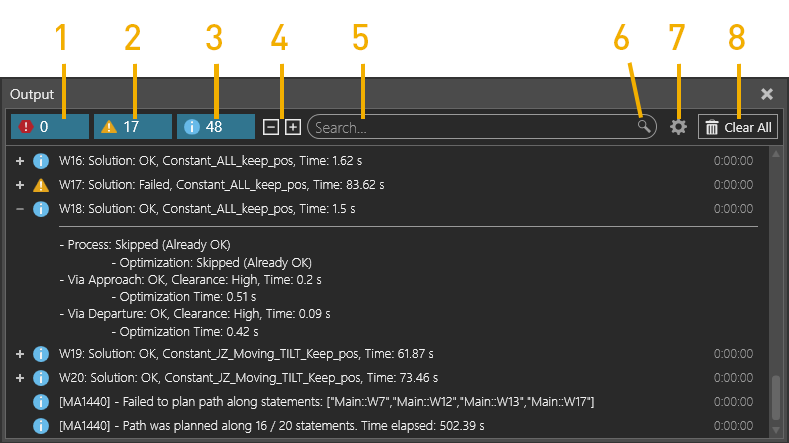
How to use the Output panel:
- Filter messages by type using tabs (1), (2), or (3).
- Expand or collapse messages:
- Click +/- next to a message.
- Use expand all / collapse all buttons (4).
- Search messages:
- Enter a keywork in the search bar (5).
- Click the search icon (6) for advanced search options.
- Adjust settings:
- Click the gear icon (7) to open Output panel settings.
- Click Clear All (8) to remove all messages.