Cancel program sync statement
Cancel Program Sync
CancelProgramSync withdraws a pending Program sync statement arrival on the robot's controller. Use it when the robot registered a sync point earlier and partners should no longer treat it as having arrived.
Set up CancelProgramSync
- In the robot's program, add a CancelProgramSync statement after the ProgramSync statement it should cancel.
- Set Sync ID to the same ID used by that ProgramSync statement.
Sync ID is an expression. Use quotes for fixed text, for example "pickup".
What happens during simulation
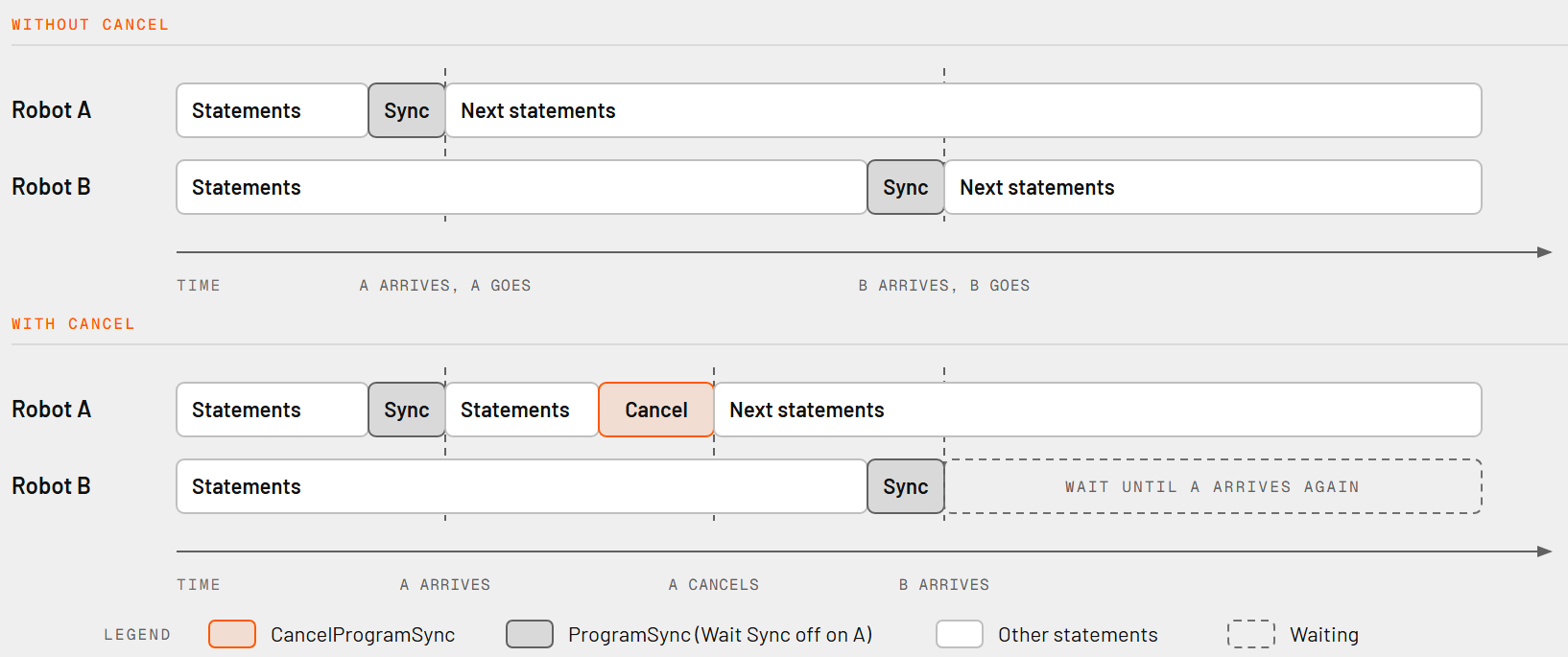
When the statement runs, the controller removes the pending sync with the given Sync ID and the program continues with the next statement. Robot B then finds no arrival from Robot A and waits until Robot A arrives again.
A sync is pending when the robot has registered its arrival at a ProgramSync and not all partners have arrived yet. This happens with a ProgramSync that has Wait Sync off.
Example
Robot A registers at "handover" without waiting, then decides the handover is no longer needed.
| Robot A program |
| ProgramSync (Sync ID "handover", Wait Sync off) |
| Move to inspection |
| CancelProgramSync (Sync ID "handover") |
Limitations and checks
- If no pending sync with that Sync ID exists on the controller, the statement reports a "SyncId not found" error and the program stops with an error. Check the ID spelling and that the sync is still pending.
- Once all partners have arrived, the sync is complete and nothing remains to cancel.
- The statement affects only the robot running it.